_4b4b5163-0637-4e66-8db8-90496b907d0a.png)
Your plan subscription is made of up two main components - the number of users and Voxel Labs add-ons. During the life of your subscription, you may have a need to change either or both of these components.
User Changes
You can modify the number of users anytime through the Primary user's account - the person that created the corporate account when signing up for the initial 30-day trial. Once logged in as that user, the left side of the screen displays categories of things that can be changed. Select the Plan tab. You should see something like this on the right side of the display: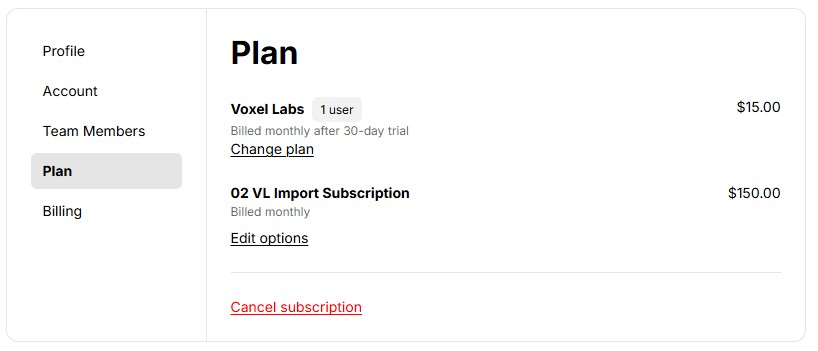
Click the Edit options link to modify the number of users. You will see this screen.
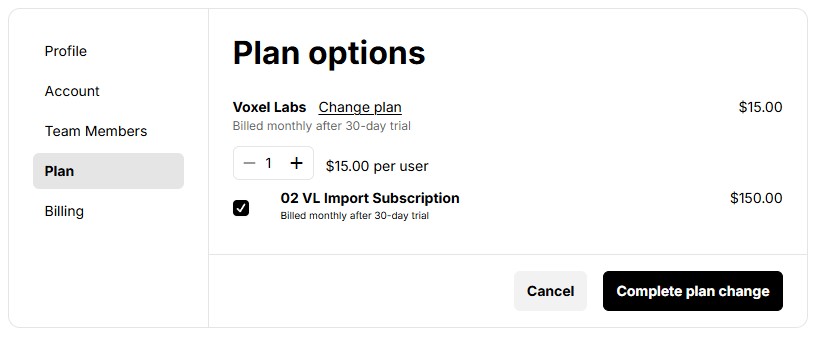
Simply click the + (to increase) or - (to decrease) the number of allowed users.
NOTE:
If you are decreasing the number of users, you MUST go to the Team Members tab and delete the users first. The system has no way of knowing which user(s) to delete so it won't allow a reduction below the number of Team Members. Once you have deleted the user(s), you can return to the Plan->Edit options and reduce the user count for the subscription.
Click Complete plan change to confirm the new number of users.
Add-on Changes
For the initial release of Voxel Link, 02 VL Import Subscription is the only module offered. There are others planned and your primary account user will receive an email as they are released. In the future, this list of add-ons will grow and you will be able to add any of them (evaluation periods will be available for each).
After you have selected the desired add-ons, click Complete plan change to confirm.